
Legs: How a Shipment Is Carried
A
Shipmentsays what has to happen: this cargo, from here to there. ItsLegs are the route by which that is met. Each leg covers a single stage of the journey, and together they add up to exactly the journey the shipment asked for.
Overview
Most shipments are carried directly: one vehicle collects the load and drives it to its destination. Some are not. Cargo may pass through a cross-dock, change vehicles partway, or travel on several vehicles at once because no single one can take it all.
A Leg is one stage of that journey. Every Shipment is carried by at least one, and however many it has, the shipment stays a single record with a single obligation to your customer.
If your organisation carries every shipment directly, legs stay in the background and there is nothing about them to learn. They come into view from the moment a shipment is first carried in more than one stage.
Key highlights
One stage each — A
Leghas exactly one pickup, one dropoff, and the loads that travel between them.Always at least one — A shipment carried directly has a single
Legspanning its whole journey.Out of sight until you need them — Legs stay in the background until a shipment is first carried in stages.
They add up to the whole journey — Orbit accepts only a set of legs that carries every load from the shipment's pickup through to its dropoff, without a gap.
Each leg travels on its own tour — Different legs can be carried by different carriers, on different days.
The status follows the slowest leg — A shipment never reports more progress than its least advanced leg.
What a leg is
A Leg covers one pickup and one dropoff, and carries some or all of the shipment's Loads. A shipment carried directly has a single leg running from its own pickup to its own dropoff. That is the ordinary case, and it needs none of your attention.
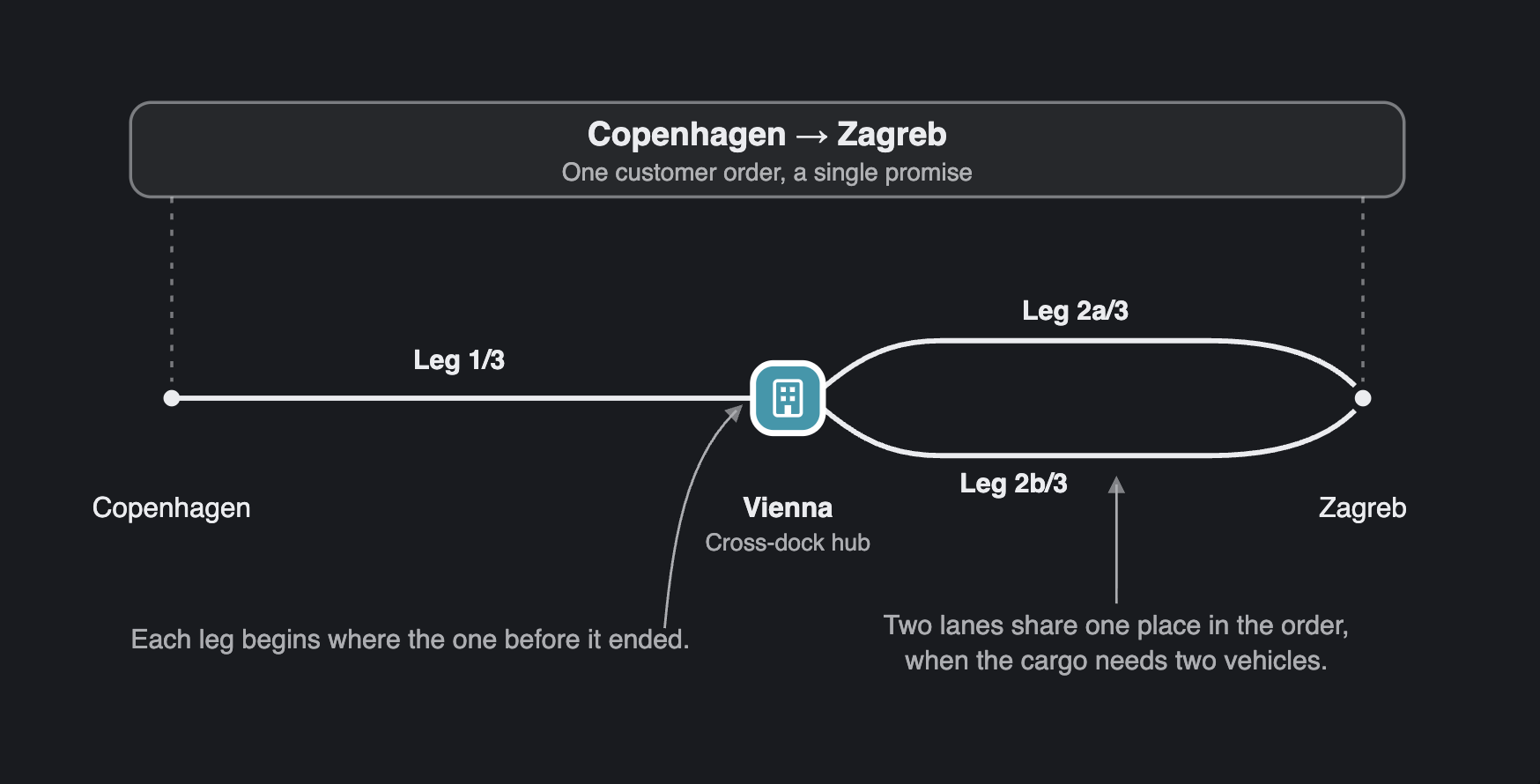
When a shipment is carried in stages, Orbit names each leg for you: Leg 2/3 · Lisbon → Berlin. Legs that leave the same address in parallel, where two vehicles collect at one site because the cargo will not fit on a single vehicle, share a place in the sequence and take lane letters: Leg 2a/3 and Leg 2b/3.
The order of the legs follows their addresses. Each leg begins where the one before it ended, so there is no sequence number to keep in step. Changing the shape of a journey means changing where its legs start and finish.
The journey always adds up
For every Load, the legs carrying it must form one unbroken chain from the shipment's own pickup to its own dropoff. Each leg's dropoff is the next leg's pickup, every load is accounted for at every stage, and no address is called at twice.
This is a guarantee rather than a guideline. A set of legs that would leave a load stranded partway, split its path in two, or carry it to an address the chain never leaves again is refused outright. A shipment cannot be put into a state where the cargo has no way of reaching its destination.
Legs that are under way, and legs that have finished, are fixed. You reshape the parts of a journey that have not begun. What a driver has already done stays exactly as it was recorded.
Legs and tours
A Leg is planned onto a Tour in the same way a whole shipment is: route it, and its pickup and dropoff take their places in that tour's ordered stops. What changes is that the legs of one shipment need not travel together. One leg can run to a hub on Tuesday with one carrier, and the next leave that hub on Wednesday with another.
Two legs of the same shipment are never routed onto the same tour. Loads travelling together on one vehicle belong on one leg, so two legs mean two distinct movements.
Because a shipment carried in stages has no single tour, you read the tour on each leg rather than on the shipment itself.
Leg statuses
Status | What it means |
|---|---|
| Not yet planned onto a |
| Planned onto a tour, which has not started moving it yet. |
| The tour is running and heading for this leg's pickup. |
| The driver has arrived at the pickup. |
| The loads are aboard and on their way to this leg's dropoff. |
| The driver has arrived at the dropoff. |
| This leg is complete. Its loads reached its dropoff. |
| This leg could not be completed. The record is kept. |
| This leg was called off before it began. |
How legs add up to a shipment's status
A shipment's status is worked out from its legs, and it follows the least advanced of them. This is what keeps it honest: a shipment with one leg delivered and another still waiting reports the one still waiting.
When the legs look like this | The shipment shows |
|---|---|
None planned yet |
|
Some planned, some not |
|
All planned, none started |
|
Any leg on its way to a pickup |
|
Any leg on its way to a delivery |
|
Loads set down at an intermediate stop, next leg yet to collect them |
|
Every leg finished, its tour awaiting review |
|
Every leg delivered and reviewed |
|
A load could not be collected or delivered |
|
Every leg called off |
|
Waiting at Hub is not a fault. It is the planned pause between two legs: the loads have reached the transfer point and are waiting to be collected onward. The loads themselves show At Hub while they wait. Partially Routed reads the same way. Part of the journey is planned and part is not yet, which is a normal stage of planning rather than an incomplete record.
Who works with legs
Legs are an operator's tool. In Orbit MissionControl a shipment lists the legs carrying it, each opening a view with its own route, loads and history. Once your organisation carries a shipment in stages, a Legs list joins the navigation so you can plan at that grain.
Drivers and carriers keep working in Tours and Stops. Orbit Cockpit and Orbit Connect show the trip in front of them, not the shipment's wider journey. The one place a staged journey reaches them is at a transfer: when a driver is due to collect goods that an earlier trip should have left, Orbit asks them to confirm the handover before they carry on. In Orbit Hub your customer follows the order and its shipments, so how a delivery is staged is yours to manage rather than theirs to track.
The Legs list
The Legs list plans at leg grain across every shipment at once, which the shipments list cannot do once journeys are staged. It offers two views: All, and Unrouted, which is the planning worklist. Unrouted gathers legs with no tour yet, together with legs that failed and need planning again. A shipment carried directly appears there as a single leg row, so it shows all of your outstanding work rather than the staged part of it alone.
Legs can be filtered by where they start and where they end, by city, postcode and country. This is what builds a hub worklist: the legs ending at a hub are the ones due in to it, and the legs starting there are the ones due out. Saved as two views, they give a transfer point the two queues it actually has.
You can select several legs at once and route them onto a new tour, add them to a tour that already runs, or hand them to the planner. Legs belonging to different shipments share a tour perfectly well, and that is how one vehicle comes to carry work for several customers.
Example
ACME Ltd books fourteen crates from Copenhagen to Zagreb, and no single vehicle is going the whole way. Orbit carries the shipment in three legs: Copenhagen to a cross-dock in Vienna, then two parallel legs onward, Leg 2a/3 and Leg 2b/3, because the crates will not fit on one vehicle leaving Vienna. Max, an operator, routes the first onto a Monday tour, and the two lanes onto tours leaving Vienna on Wednesday and Thursday. On Wednesday evening the first lane is delivered in Zagreb, and the shipment still reads Waiting at Hub: the remaining crates are on the dock in Vienna, waiting for Thursday's vehicle. Only once that lane arrives and its tour is reviewed does the shipment reach Delivered. The customer, following the order in Orbit Hub, sees one delivery to Zagreb.
Frequently asked questions
Do I have to plan in legs?
No. A shipment carried directly has a single Leg covering its whole journey, and you plan, route and follow it exactly as you would any shipment.
I do not see legs anywhere in Orbit. Why?
Because no shipment in your organisation has been carried in stages yet. Legs stay in the background until the first one is split, and the leg views appear from then on.
Where do I find the legs that still need planning?
In the Legs list, under Unrouted. It gathers every leg that has no tour yet, across all of your shipments, together with any that failed and need planning again.
My shipment shows Waiting at Hub. Is something wrong?
No. Its loads have been set down at a transfer point and are waiting for the next leg to collect them. This is the planned pause between two stages of the journey.
Can two legs of one shipment be on the same tour?
No. Loads travelling together on one vehicle belong on a single Leg. Different legs of the same shipment can, however, be on different tours at the same time, and that is what makes a transfer possible.
Why can I not change this leg?
Because it is already under way or has finished. Legs that have not started can still be reshaped. Those that have are fixed, so the record of what a driver did stays accurate.
Can I read legs through the API?
Yes. Legs are available programmatically, including the legs of a shipment and the legs on a tour. See the Orbit API Reference for the available endpoints and fields.