
Property Value Rules
Value rules check a property value at the moment it is saved — against a pattern, a length, a range, or against your own system over HTTPS — and turn the value away before the record is written.
Overview
A Property holds information your organisation cares about: an internal reference, a certificate number, a delivery id issued by another system. Orbit already checks that a value fits the field's type, so a numeric property will not accept letters. Value rules go further. They describe what a correct value looks like, and Orbit enforces them on every write — from Orbit MissionControl, from Orbit Hub, from the CSV importer, and from the Orbit API alike.
The most capable rule is the External Check. It hands the value to an HTTPS endpoint you operate and lets your own system decide. That is how an id owned by a third-party system stays authoritative: Orbit asks your system whether the id is acceptable, and refuses to create the record if it is not.
If you are new to Properties themselves, start with Orbit Properties (Custom Fields).
Key highlights:
Enforced on every path — The same rules apply whether a value arrives through the user interface, an import or the Orbit API. There is no path that skips them.
Checked at the moment of saving — A record that fails a rule is never created, so a rejected value cannot reach your downstream systems.
Your own system can decide — An External Check calls an endpoint you operate and enforces its verdict.
Safe by default — If your endpoint cannot be reached, the write is rejected rather than let through unchecked.
Values can be locked — A property can be set once and never changed again.
Forward-only — Adding a rule never invalidates data you already hold.
How rules are applied
Rules live on the property definition, not on a form, so every record that carries the property is held to the same standard. Three behaviours are worth understanding before you configure anything.
Only values that change are checked. Orbit compares what is being written against what is stored. Editing a shipment's delivery date does not re-check its reference number, because that value did not move.
Rules apply from now on. Values stored before you added a rule stay exactly as they are. They are checked the next time somebody changes them. Adding a strict rule to a busy property therefore cannot break existing records, but it also means old values may not satisfy the rule you just wrote.
Checks run in order, and stop at the first failure. The lock is evaluated first, then the pattern, length and range rules, and the External Check last. If a value fails a simple rule, your endpoint is never called. This keeps obviously malformed input away from your system.
Rule types
Rules are available on Text and Numeric properties. Every other type — checkbox, select, multiselect, document, tags — can still be locked, but carries no value rules.
Rule | Applies to | What it does |
|---|---|---|
Pattern | Text | The value must match a regular expression in full. Case-sensitive, no flags; backreferences and lookaround are not supported. |
Length | Text | The number of characters must fall between a minimum and a maximum. One of the two is enough. |
Range | Numeric | The number must fall between a lowest and a highest value. One of the two is enough. |
External Check | Text, Numeric | The value is sent to an HTTPS endpoint you operate, which answers whether to accept it. |
A definition can carry up to ten rules, of which at most one may be an External Check. A pattern must match the whole value, so ^INV-\d{4}$ accepts INV-0042 and rejects Ref INV-0042/b.
Locking a value
Lock After First Entry makes a value permanent. Once it has been set, it can neither be changed nor cleared, on any path. Correcting a locked value means deleting the record and creating it again. This is deliberate: for an identifier that another system has already recorded, a silent correction in Orbit is worse than a refusal. The lock is available on every property type.
Setting up rules
An administrator configures rules in Orbit MissionControl under Settings → Properties. The Value Rules column summarises what each definition enforces, so you can see at a glance which fields are governed and which are open.
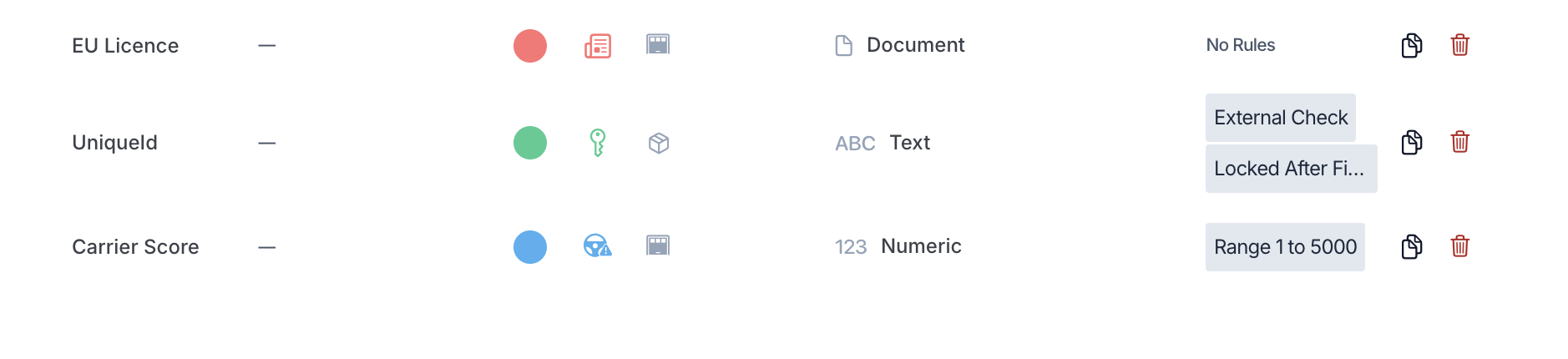
Settings → Properties in Orbit MissionControl. The Value Rules column names what each definition enforces: UniqueId carries an External Check and a lock, Carrier Score accepts 1 to 5000, and EU Licence is left open.
Open the cell to edit the rules, or set them while creating the property. Use Add Rule and pick a type; only the rules that suit the property's type are offered, so an invalid combination cannot be built. Each rule takes an optional Rejection Message, shown to whoever enters a value it turns away. Write it in the languages your operators use, and say what a correct value looks like — a message that explains the format saves a support request.
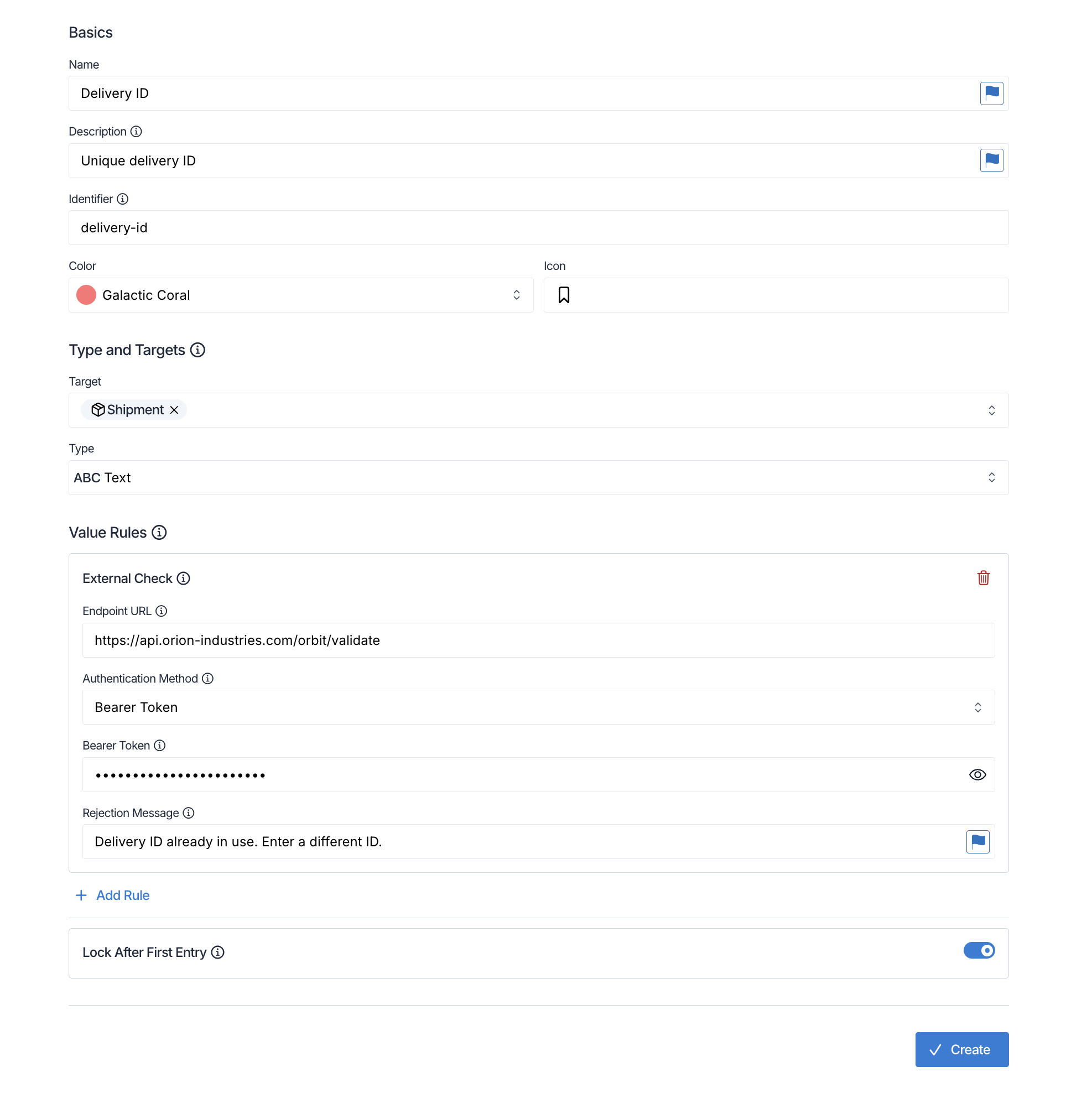
The rules editor for a Delivery ID property. The External Check card holds the endpoint URL, the authentication method and the credential, which is write-only and shows as dots once it has been saved. Lock After First Entry is switched on, so an accepted ID can never be changed afterwards.
What a rejection looks like
A rejected value is reported on the field itself, so the person entering it can see which value is at fault and correct it in place. The message shown is the one your endpoint returned; if it returned none, Orbit falls back to the Rejection Message configured on the rule, and then to a standard message.
The composer's pre-submit check does not consult your endpoint. It covers the lock and the pattern, length and range rules only, so a value an External Check will refuse still passes it. The endpoint is called when the booking is submitted.
Submission completes in the background, so the refusal arrives a moment after the click rather than instantly. The draft reopens with the message on the field.
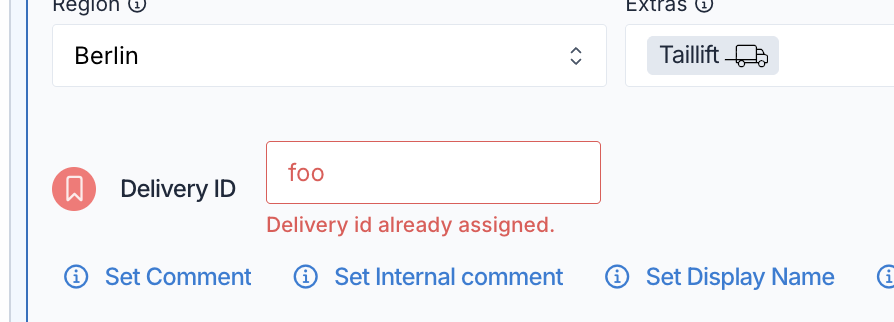
A refused value in the composer. The value stays on the field so it can be corrected in place. The message shown is the one your endpoint returned; the Rejection Message configured on the rule is used only when the endpoint returns none.
The External Check
An External Check makes your own system the authority on a value. Orbit sends the value to your endpoint at the moment of saving and enforces the answer. This section describes the contract in full; it is written for whoever builds the endpoint.
When Orbit calls
The call sits in the saving path, immediately before the record is written. Orbit calls your endpoint when a value is created or genuinely changed, and at no other time. Building a draft, editing one, running the composer's pre-submit check, and reading a document with Decode never reach your endpoint — those are working states, and a value there is not yet committed to anything.
Within one save, Orbit calls your endpoint once per value. A value that lands on several records in the same booking produces a single call, not one per record. At most four calls are in flight at a time.
The request
Orbit sends a POST with Content-Type: application/json and this body:
{
  "value": "L-2024-118234",
  "entityType": "shipment",
  "propertyId": "9c1f8e42-5c7a-4a1e-9c0b-2f3d5a7e1b44",
  "tenantId": "3a7d1c60-8f42-4c19-b0a5-6e2f9d41c7ab",
  "requestId": "0b9d2f83-1a64-4e77-9c31-5d8a0f2b6e14",
  "draftId": "f42a7e19-3c85-4b60-a7d2-91e5c0b83d67",
  "occurredAt": "2026-09-02T10:15:00.000Z"
}
Field | Meaning |
|---|---|
| The value exactly as it was entered, as a string or a number. Orbit normalises nothing: no trimming, no case folding. Equivalence is entirely your endpoint's decision. |
| The record type the value lands on, for example |
| The id of the property definition. This is the stable key to hang your rules on. |
| The Orbit organisation the write belongs to. |
| The identity of this save attempt, and your idempotency key. Stable across Orbit's internal retries within one attempt; new every time somebody submits again. |
| Optional. The booking draft the write comes from, present on the usual manual booking path and absent on direct API writes. Unlike |
| Optional. The id of the record being changed. Absent when a record is being created, because it does not exist yet. Your logic must not depend on it. |
| ISO 8601 timestamp of the save attempt, in UTC. |
The response
Answer with HTTP 200 and a verdict. Accept a value:
{ "valid": true }
Reject one, optionally with your own message:
{
  "valid": false,
  "message": {
    "de": "Liefer-ID bereits am 12.05. vergeben (System XY).",
    "en": "Delivery id already assigned on 12 May (system XY)."
  }
}
message is optional and keyed by language code (de and en). Each message is limited to 500 characters. When present it is shown to the person entering the value in place of the rejection message configured in Orbit, so it is worth saying what went wrong and what to do about it. Unknown keys in the body are ignored.
The verdict always travels inside an HTTP 200. An HTTP error status is not a rejection — it is treated as your endpoint being unavailable, which also blocks the write but reports a different reason to the user. Reject a value with 200 and "valid": false.
Authentication
The endpoint must be HTTPS, and credentials may not be embedded in the URL. Four methods are available, the same set that webhook deliveries offer:
Method | What Orbit sends |
|---|---|
None | No credentials. Suitable for an endpoint protected by a network allowlist or client certificates. |
Basic |
|
Bearer |
|
HMAC | The request body is signed with a shared secret. Orbit sends the signature in |
Secrets are write-only. Once saved, every read of the definition returns the placeholder __MASKED__ instead of the value, including through the Orbit API. Sending that placeholder back when you edit the definition keeps the stored secret unchanged, so you can adjust the URL or the rejection message without retyping the credential. Rotating a secret means saving a new one and retiring the old one on your side.
Timeouts and availability
Orbit allows your endpoint 5 seconds and makes one attempt. There is no retry. Aim well inside that budget, because the person booking is waiting on the answer.
Anything other than an HTTP 200 carrying a well-formed verdict counts as the endpoint being unavailable, and the write is rejected. That covers a timeout, a network or TLS failure, any other status code, a body that is not JSON, a verdict with the wrong shape, a message over 500 characters, and a response body above 64 KB.
Because an unreachable endpoint blocks the write, its availability determines whether these bookings can be made in Orbit at all. Operate and monitor it as a production-critical service.
Check and mark in one step
If your endpoint enforces uniqueness, a plain lookup is not enough. Between your answer and Orbit's write there is a gap in which your own system could issue the same id to somebody else. The endpoint has to check and claim the value in a single atomic step:
-- holder = draftId when present, otherwise requestId
INSERT INTO claimed_ids (value, holder) VALUES (:value, :holder)
ON CONFLICT DO NOTHING
Insert succeeded →
"valid": true.Conflict, but the holder is the same →
"valid": true. This makes Orbit's internal retries harmless, and withdraftIdas the holder it also makes a resubmission of the same draft harmless.Conflict with a different holder →
"valid": false, with a message.
Equally important: your own id issuing must run through the same claim. If another part of your system hands out ids without touching that table, no amount of checking in Orbit will guarantee uniqueness.
Prefer draftId as the holder key wherever it is present. If a save fails after your endpoint has already claimed the value, the claim is left holding an id no record uses. With draftId, resubmitting the same draft presents the same holder and is answered as "already yours", so the situation resolves itself. Orbit never calls your endpoint to release a claim, so cleaning up abandoned claims is your side's responsibility.
Through the Orbit API
Rules apply to writes through the Orbit API exactly as they do in the user interface. A rejected write answers HTTP 400 with an issues array; each issue carries the offending propertyId and a code:
Code | Meaning |
|---|---|
| A pattern, length or range rule was not satisfied. |
| Your endpoint answered |
| Your endpoint could not be reached or answered unusably. The write is worth retrying. |
| The value is locked and already set. |
Bulk creation deserves a note. When a property in a bulk shipment request carries an External Check, Orbit switches that request to per-row handling: it accepts at most 40 rows, answers 200, and reports the rows it could not create individually, each with its code and whether retrying is worthwhile. The good rows are created. Bulk order creation stays all-or-nothing. If the whole request runs out of time waiting on external checks, Orbit answers 503 and nothing is written.
Example
Orion Industries in Rotterdam books its deliveries in Orbit, but delivery ids are issued by the warehouse system it has run for a decade, and that system must stay the single source of truth. An administrator adds a Text property, "Delivery ID", to shipments, and gives it two rules: a Pattern of ^L-\d{4}-\d{6}$ so a typo is caught before anything leaves Orbit, and an External Check pointing at https://api.orion-industries.com/orbit/delivery-id. The property is also locked after first entry, because a delivery id that changes after the warehouse has recorded it would break the link between the two systems. When Julia books a shipment and types L-2024-118234, Orbit sends the value to the warehouse system, which claims the id in the same transaction that checks it and answers {"valid": true}. The shipment is created. When a colleague later reuses the same id, the warehouse system finds it claimed by a different booking and answers {"valid": false} with "Delivery id already assigned on 12 May", which Julia's colleague sees directly on the field.
Orbit's extensive API reference is separated from Orbit Docs and can be found here: Orbit API Reference.
FAQ
Will adding a rule invalidate the values I already have?
No. Rules apply to values written from the moment you save them. Existing values stay as they are and are checked only when somebody changes them.
Can I put a rule on a select or checkbox property?
Value rules are available on Text and Numeric properties. Every other type can still be locked after first entry.
What happens if my endpoint is down?
The write is rejected and the person booking is told the external check did not respond. Nothing is created. This is deliberate: letting an unchecked value through would defeat the purpose of the check.
Is the endpoint called while somebody is still filling in a form?
No. It is called on submission, once per value. Drafts, edits to drafts, the composer's pre-submit check, and values read out of a document by Decode never reach it.
The pre-submit check passed, so why was the booking refused?
That check covers the lock and the pattern, length and range rules. It does not call your endpoint. An External Check is consulted only when the booking is submitted, so a value it refuses will pass the earlier check.
Can I use more than one External Check on the same property?
No, one per property definition. You can combine it with pattern, length and range rules, which run first.
Can I read the credential back out of the Orbit API?
No. Secrets are write-only and every read returns __MASKED__. Send that placeholder back on an edit to keep the stored value.
How do I correct a locked value?
Delete the record and create it again. A locked value cannot be changed or cleared on any path, including the Orbit API.