
Recurring Transports
Recurring Transports
Recurring Transports let you define a
Touronce and have Orbit generate it automatically on a repeating schedule — every weekday, three times a week, or any weekly pattern you choose. They are the natural way to run line hauls: the fixed, repeating connections between hubs or terminals that form the backbone of a transport network.
Overview
Many logistics operations repeat the same route on a fixed rhythm. The classic case is a line haul — the regular trunk run between two fixed points in a network, such as a nightly truck between a terminal in Rotterdam and a hub in Lyon, or a daily shuttle between a port and an inland depot. The same pattern applies to a bakery supplying the same shops every morning, or a parts distributor running a fixed Monday–Wednesday–Friday route. Creating each of these Tours individually is slow and error-prone.
A Recurring Tour solves this. You build a master Tour once — its stops, times, Region, vehicle class and, optionally, a Carrier and pricing — and attach a weekly schedule to it. Once activated, Orbit generates a fresh Tour for each occurrence automatically, ahead of time, so your team always has the upcoming work ready to plan and dispatch. Set the trunk route up once, and every scheduled run is created for you.
Key highlights:
Built for line hauls — Model the fixed, repeating trunk routes between your hubs and terminals as a single recurring series.
Define once, repeat automatically — A single master
Tourproduces an ongoing series of scheduledTours.Flexible weekly schedule — Choose any combination of weekdays, with one start time per day.
Lead time — Generate each
Toura chosen number of days in advance, giving your team time to prepare.Full lifecycle control — Activate, pause, resume or end a series at any time without losing the
Toursalready created.Inherited carrier and pricing — Assign a
Carrierand set a fixed price once; every generatedTourinherits them.Built-in safeguards — Orbit prevents impossible schedules, such as a start date in the past or more than one start on the same weekday.
How Recurring Transports Work
A Recurring Transport has two parts: the master, which holds the template and the schedule, and the instances, which are the individual Tours Orbit creates from it.
You create a master
Tourin Orbit MissionControl using the transport composer, with at least two stops and a valid time on each.You attach a schedule — the weekdays it should run, an optional start and end date, and a lead time.
You activate the series. Orbit registers the schedule and begins generating
Tours.From then on, each occurrence produces its own
Tour, dated and named according to the schedule, ready for your team to fill, plan and dispatch.
A master moves through a small set of clearly labelled states:
Status | Meaning |
|---|---|
| The master has been created but the schedule is not yet running. No |
| The schedule is live and Orbit is generating |
| Generation is stopped. Existing |
| The series is finished permanently. The schedule is removed and cannot be restarted. |
Setting Up a Recurring Tour
You configure everything from the recurring schedule card at the top of the transport composer in Orbit MissionControl.
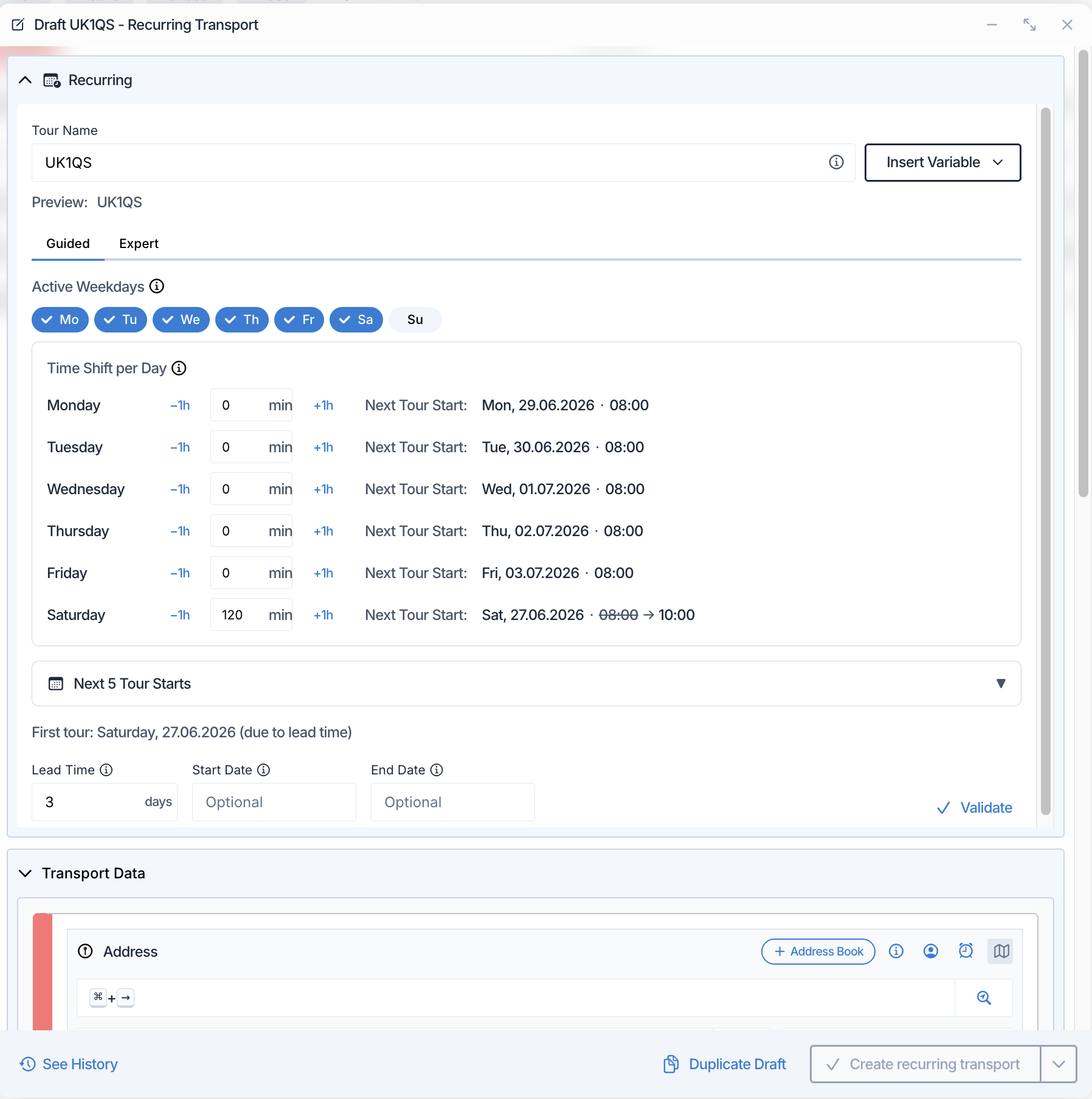
The recurring schedule card in Orbit MissionControl: choose the active weekdays, set the lead time, and preview the next tour starts.
Choosing the schedule
There are two ways to define when the Tour repeats:
Active weekdays — The guided option. Select the weekdays the
Tourshould run (for example Monday, Wednesday and Friday). Orbit shows you the next few start dates as you choose, so you can confirm the pattern at a glance.Expert — For advanced patterns, enter the schedule directly. You can also describe the schedule in plain words — for example "every weekday at 08:00" — and let Orbit translate it for you.
A Recurring Tour starts once per day on each active day. If different days need slightly different timings, use the per-day time shift to move all stops earlier or later on a given weekday.
Lead time
Lead time controls how many days before the run date each Tour is created. A lead time of three days means the Tour for next Monday appears the previous Friday, giving your team the weekend to assign a vehicle and prepare. A lead time of zero creates the Tour on the day it runs.
Start and end dates
Both are optional:
Start date — The earliest date the series may generate
Tours. Leave it empty to begin as soon as you activate.End date — The last date the series runs. Leave it empty for an open-ended schedule.
Naming generated Tours
You can set a name template for the series so every generated Tour is identifiable at a glance — for example incorporating the run date or weekday. A live preview shows you how the name will read.
Activating, Pausing and Ending a Series
You manage a Recurring Tour from the recurring tours list in Orbit MissionControl, or from the composer itself.

Controlling a series from the recurring tours list: pause, resume, show instances, or end the recurring tour.
Activate — Starts the schedule. Orbit checks that the master is complete — at least two stops with valid times, a
Region, an active vehicle class, and a lead time within the allowed range — before the series goes live.Pause — Stops generating new
Tourswhile keeping the master and all existingToursintact. Use this whenever you need to change the schedule.Resume — Restarts a paused series from its next occurrence.
End — Permanently stops the series and removes the schedule.
Toursalready generated are kept. A series cannot be reactivated once ended — to start again, create a new Recurring Tour.
The schedule is locked while a series is Active. To change the weekdays, lead time or dates, pause the series first, make your changes, then resume.
Carrier and Pricing
A Recurring Tour carries its Carrier and pricing on the master, and every generated Tour inherits them:
Carrier — Assign a
Carrieron the master just as you would on anyTour. Each generatedTouris assigned the sameCarrierautomatically.Pricing — Set a fixed price on the master as manual price lines. The price is captured when you activate the series, and the same fixed price is applied to every
Tourit generates.
To change the Carrier or pricing for future Tours, end the current series and create a new one with the updated details.
Tracking the Series
The recurring tours list in Orbit MissionControl gives you an overview of every series and its progress. For each one you can see:
The weekdays it runs on and when the next
Tourwill be created.Its current status —
Active,PausedorEnded.The lead time in days.
How many
Toursthe series has generated, with quick access to view them all.
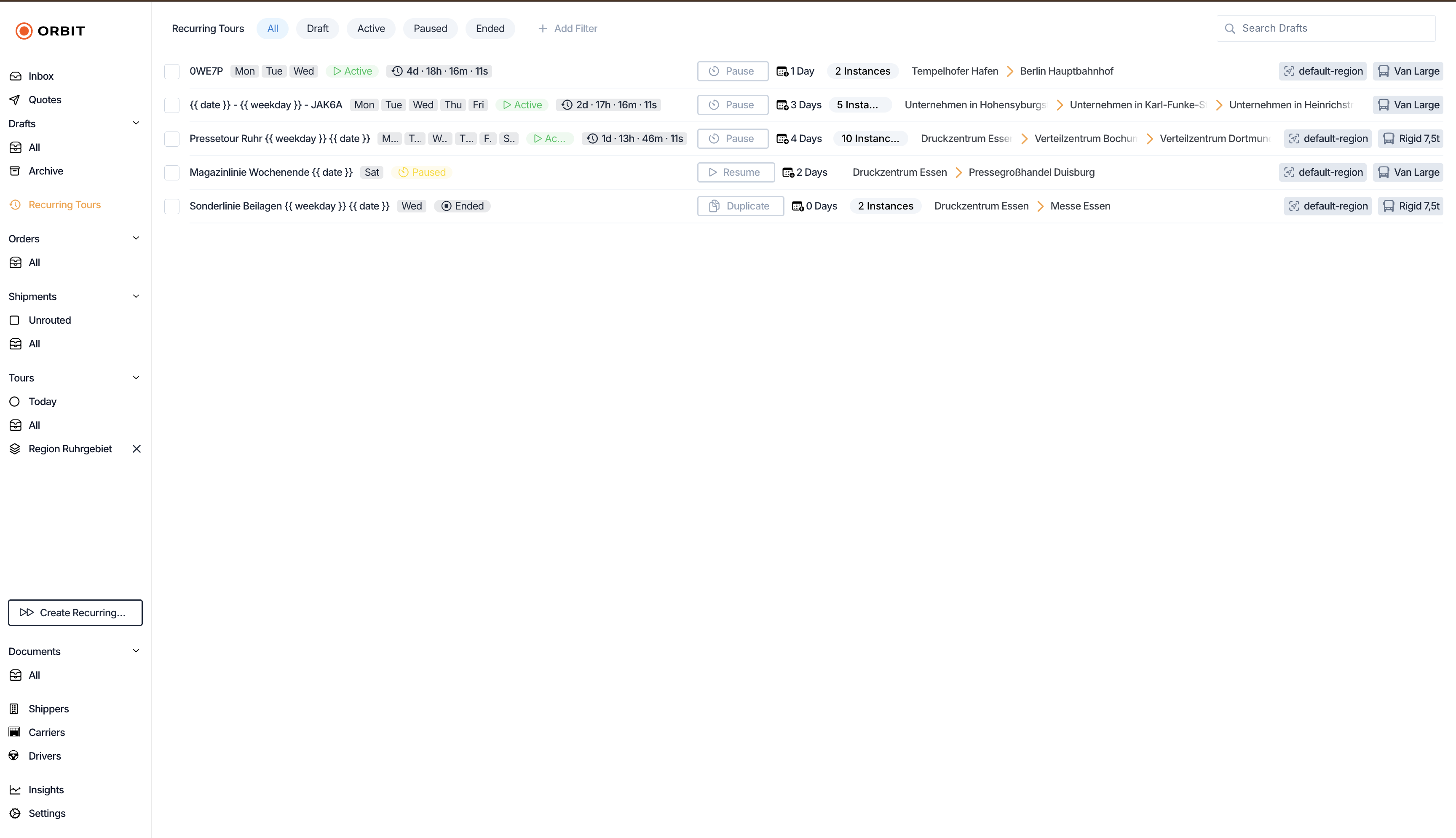
The recurring tours list: weekday badges, status, lead time, next creation date, and instance count for every series.
Generated Tours are marked as coming from a Recurring Tour, so they are easy to recognise in your Tour lists, and you can tell at a glance whether each one has already been filled with work or is still empty.
Example: a line haul between two terminals
Spaceport Shipping Co. runs a nightly line haul between its terminal in Rotterdam and its hub in Lyon, departing every Monday, Wednesday and Friday at 22:00. An operator at Spaceport opens Orbit MissionControl, builds the Tour once with both stops and their times, assigns the regular line-haul Carrier, and sets the fixed trunk price. In the recurring schedule card they select Monday, Wednesday and Friday and set a lead time of two days. When they activate the series, Orbit prepares each upcoming Tour two days ahead of its run, already carrying the right Carrier and price. The dispatch team simply adds the night's Shipments and sends the driver on the way — no one rebuilds the trunk route again.
Technical Details
Recurring Tours can also be managed programmatically. For request and response schemas, see the Orbit API Reference.
FAQ
Can I change the schedule after I have activated a series?
Yes. Pause the series first, adjust the weekdays, lead time or dates, then resume. The schedule is locked while a series is active to prevent accidental changes.
What happens to the Tours that were already created when I pause or end a series?
They are kept. Pausing and ending only affect future generation — any Tour Orbit has already created stays in place and can be planned and dispatched as normal.
Can a Tour repeat more than once on the same day?
No. A Recurring Tour starts once per day on each active weekday. If you need a second run, create a second Recurring Tour.
Can different weekdays have different start times?
Yes. Use the per-day time shift to move all stops earlier or later on a specific weekday, while keeping a single series.
Do I have to assign a Carrier?
No. A Carrier is optional. If you assign one on the master, every generated Tour inherits it; if you do not, the generated Tours are created without a Carrier and can be assigned later.
Can I restart a series after ending it?
No. Ending a series is permanent. To run the same pattern again, create a new Recurring Tour from the master.
Why has my first Tour not appeared yet?
Generation is controlled by the lead time and the start date. A Tour appears its lead-time number of days before it runs, and never before the start date. If your start date falls inside the lead-time window, Orbit tells you the date the first Tour will actually be created.
Is there a limit to how far ahead Tours are created?Tours are created according to the lead time — each one appears that many days before its run date, not all at once. This keeps your Tour lists focused on the work that is actually coming up.